
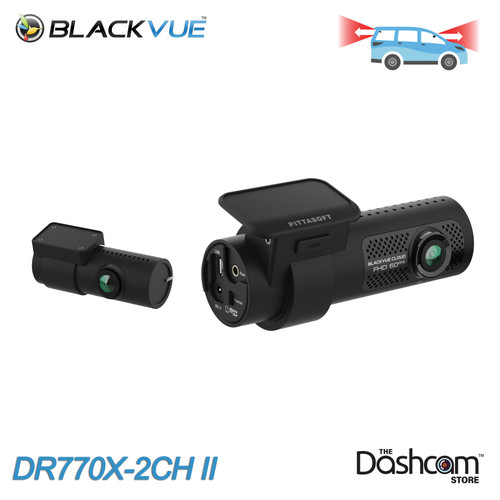




Full HD Front and Rear Recording
Powered by Sony STARVIS Sensors


Access The Cloud
via optional LTE module

Seamless app pairing
Connect Instantly. Control Effortlessly

The DR770X Series Just Got Better
- Enhanced video quality
- 1TB microSD support
- Improved audio recording with reduced noise
- Optimized Wi-Fi performance
- Start up time reduced from 24–36s to ~14s
The next evolution of the BlackVue DR770X series, this upgraded lineup delivers enhanced video quality, faster boot times, and optimized Wi-Fi performance for seamless connectivity. With expanded 1TB microSD support and improved audio recording, every detail is clearer than ever. Experience smarter protection with a dash cam that’s ready when you are.
Key Upgrades
Front + Rear Recording
This Front + Rear dual channel setup provides a near 360-degree bubble around your vehicle, ensuring incidents while driving and while parked are captured no matter the circumstance. This is a great option for parents of teen drivers, company vehicles, and daily commute vehicles.

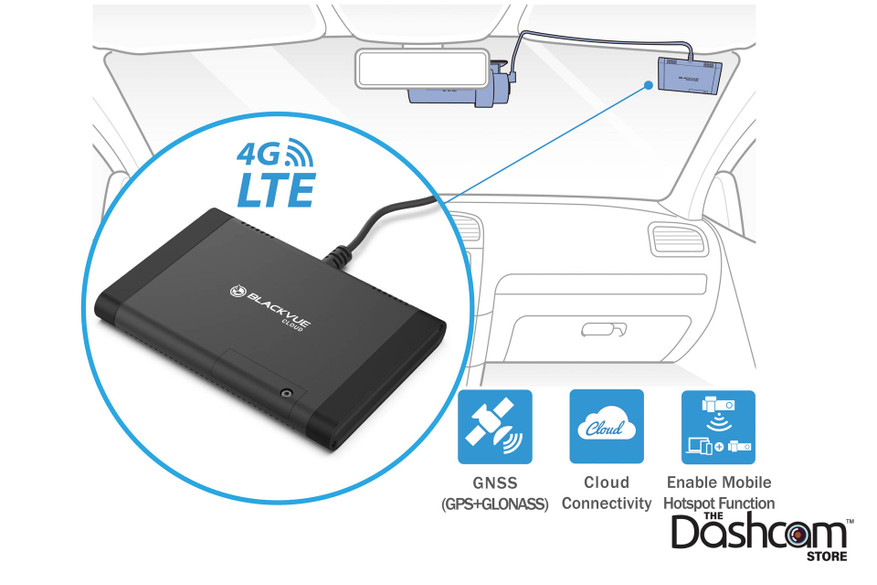
Optional LTE Module
The optional CM100LTE module makes it easy to connect to the cloud 24/7. This add-on device connects to the DR770X front camera via USB port, providing a constant internet connection and allowing the DR770X to serve as a mobile hotspot for up to five devices. Unlike in-vehicle Wi-Fi hotspots, the module stays powered on while parked and provides access to your dash camera from anywhere in the world. If you'd like LTE built directly into your dash cam, check out the DR970X-2CH-LTE-PLUS II
BlackVue Cloud
Packed With Innovative Features Live View, Emergency Alarm, GPS Tracking,Two-way Voice Communication, Video Backup, Remote Video Playback, the possibilities are endless. BlackVue Over the Cloud is all about using your dashcam to its full potential, so that you and your car are always connected

Parking Mode
Connecting the DR770X to your car via the included Hardwiring Power Cable or the optional B-130A Battery Pack battery pack allows for parking mode. When parked, the DR770X can also detect any visual movements around your vehicle. These events are automatically tagged and saved. If a cloud connection is present, you'll have the ability to receive alerts and view the clips from both computer and mobile device.

More Features & Information
The DR770X is of course still fully functional as a 'typical' dash cam, recording at all times when you drive, whether you choose to utilize the optional LTE / Cloud features or not:
- When plugged in to your standard power outlet in the vehicle, the system will still power on and off with the vehicle, automatically recording audio, video and GPS speed & location at all times as you drive.
- For motion detection ("parking mode") recording, the DR770X can be hardwired directly to the vehicle's electrical system via the included direct-wire cable. Alternatively, the DR770X can also be powered by the BlackVue B-130A Battery Pack instead of your car battery while the vehicle is parked.
- All normal driving and parking mode recordings are automatically stored locally on the internal BlackVue memory card (64/256/512 GB options available). Once the memory card is completely 'full', only the oldest video file on the card is overwritten as each new video file is created (this is known as loop recording).
- The memory card can be removed and plugged in to your PC or Mac using a microSD to USB adapter. This is an easy way to do a bulk download or backup of all your videos.
- The DR770X does not have a screen on it from which to play back recorded videos from the memory card. Thankfully, the recordings can be accessed via a direct WiFi connection. You can connect to the 750X with your smartphone the same way you would connect to a WiFi network at home or at Starbucks, then use the free BlackVue app to view and download your recordings directly from the camera.
- Audio recording, on by default, can be disabled temporarily, or turned off completely by default.
- GPS speed display can be disabled from being visible in your video recordings.
- Everything you need to use the system is included in the box: front camera with adhesive windshield mount, BlackVue memory card, plug-in power cable, optional direct-wire power cord, etc.
A Note on Memory Cards
All BlackVue dashcams include a BlackVue-branded 64, 256, 128, 512 GB memory card. While the memory cards are
removable and the card
slots will accept other brands of memory cards, we strongly suggest the use of only BlackVue memory cards in the
BlackVue dashcams, as the use of a non-BlackVue memory card may cause performance issues and may void your
manufacturer’s warranty.
BlackVue OEM memory cards are industrial-grade VNAND-type microSD cards and are designed and tested to withstand the
extreme temperatures, vibrations and
the constant read/write cycles of high quality dashcams. Typical consumer-grade memory cards such as those from
SanDisk are simply not up to the task. Stick with the OEM BlackVue memory cards to ensure your dashcams are always
recording when it matters most.
Why Buy from The Dashcam Store? To Name a Few...
- Free UPS/FedEx ground shipping on all dashcam purchases
- Excluding pre-orders, if you can buy it online, it's in stock!
- All in-stock items will ship next business day
- USA sales, shipping and support: we're headquartered in Austin, TX, y'all!
- One year warranty on all dashcams, extended warranties are available
- 60-day return window, hassle free return policy
- Official authorized BlackVue distributor in North America
- Phone, email, and live-chat sales and technical support
- Dashcam experts, dashcams are all we do! Test our knowledge and expertise!
- Price match guarantee
- Military & First Responder discount
- Support an American small business, we appreciate it!
Availability
*** In stock and shipping FREE from Texas now! *** Order today!
The Dashcam Store™ is an official USA, Canada and Mexico distributor of the BlackVue product line. Beware of unauthorized or grey-market third-party sellers!
User Manual
- Coming Soon!
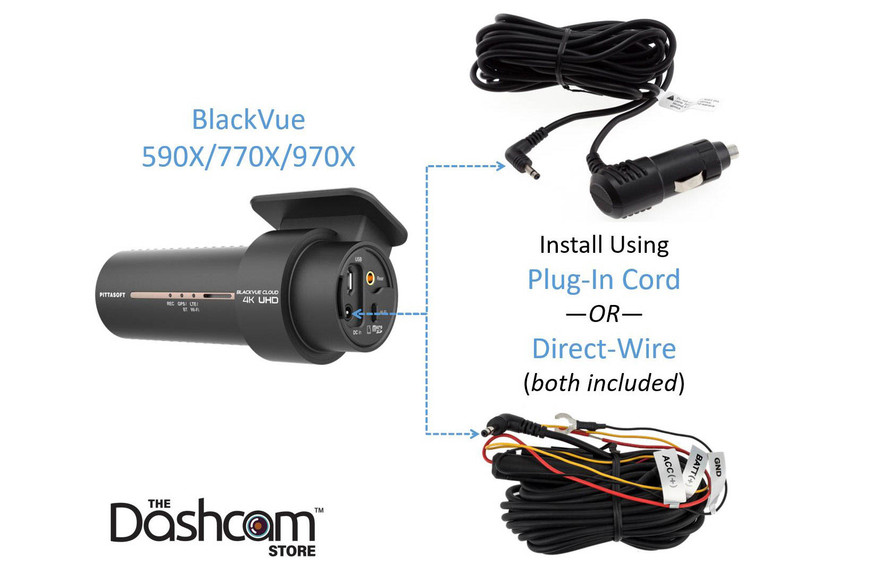
The DR770X-2CH II Can Be Installed/Powered in One of 3 Ways
- Plug the standard plug-in power cord (included) into an available 12V DC outlet in your vehicle (no "parking mode" recording), or,
- Connect the direct-wire power cable (also included) directly to your fuse box (see diagrams below). This enables safe "parking mode" recording. Or,
- Utilize a standalone BlackVue B-130A battery pack (optional, not included)
The DR770X-2CH II Features Native Parking Mode
Thanks to the BlackVue DR770X-2CH's native (built-in) Parking Mode, the included direct-wire harness can be safely connected directly to the fuse box. Parking mode with low-voltage safety cutoff can then be configured to your specifications in the dashcam settings.
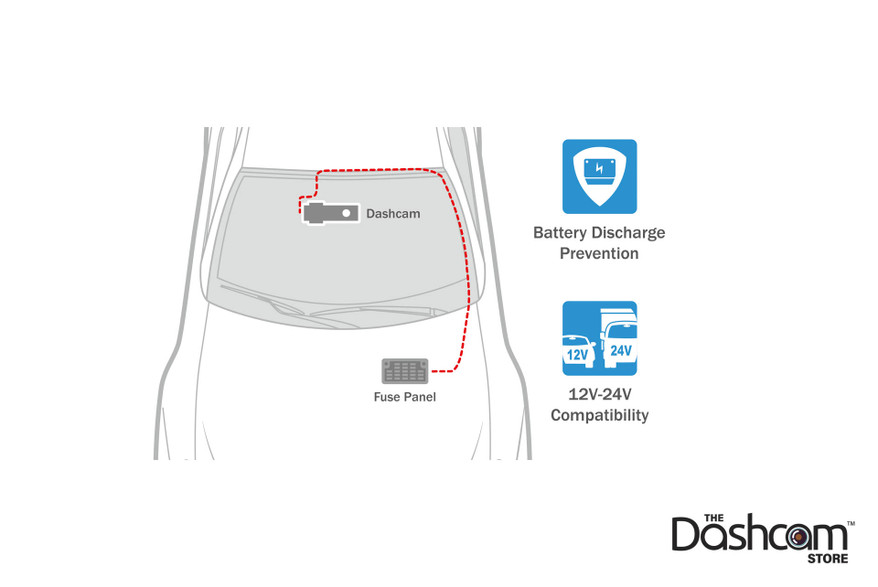
Optional Fuse Tap Bundle
Add our optional fuse tap bundle for the easiest and safest "plug-and-play" integration of the direct-wire harness to your vehicle fuse box.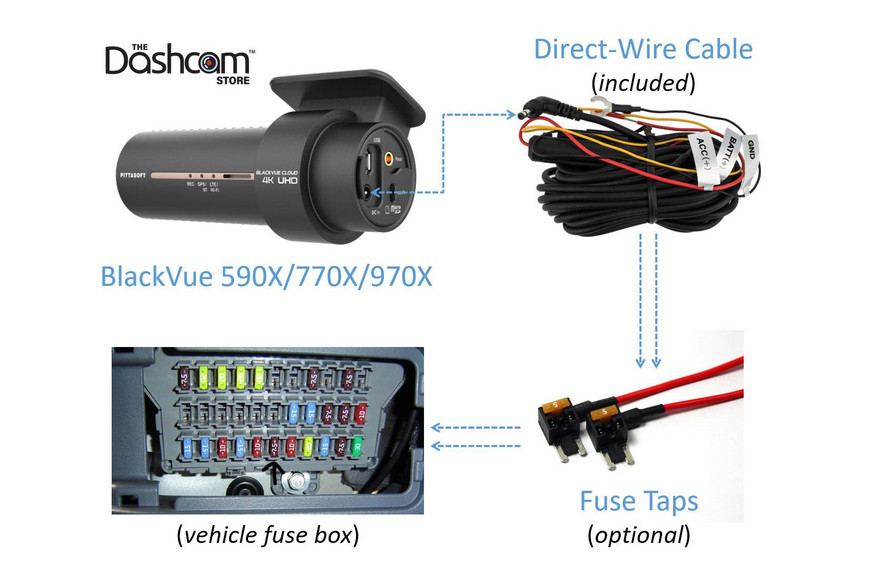
General BlackVue Dash Cam Installation Resources
Example Installation Photo Galleries
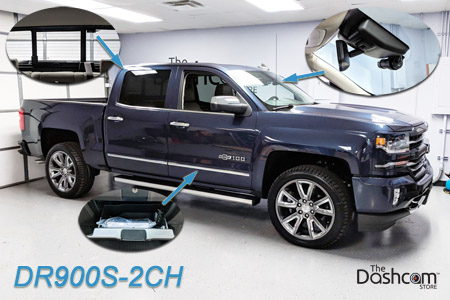
Chevy Silverado - DR900S-2CH + Power Magic Pro:
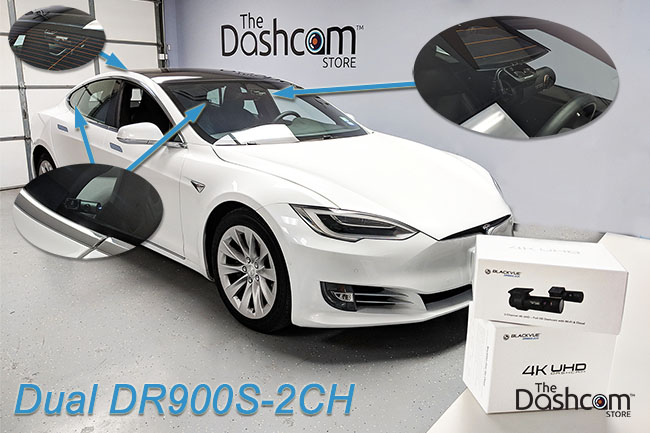
Tesla Model S - Dual DR900S-2CH + Dual Power Magic Pros:
Dodge Ram 1500 - DR900S-2CH + Power Magic Pro:

Frequently Asked Questions - BlackVue DR770X-2CH
- How does the DR770X-2CH II compare to the DR770X-2CH?
- Enhanced video quality
- 1TB microSD support
- Fast Record: boot time reduced from 24–36s to ~14s
- Improved audio recording with reduced noise
- Optimized Wi-Fi performance
- External GPS Auto Switch (supports external GPS module)
- Included Accessories: USB-C car charger, USB-C power cable, hardwiring cable (cigarette lighter power cable not included)
- New package design
- How does the DR770X-2CH II compare to other BlackVue models? Please see our BlackVue Dash Cam Buyer's Guide for a detailed comparison
- How can I connect to the DR770X-2CH with my smartphone or via the Cloud? Answer: Two Methods to Connect Wirelessly to Your BlackVue Dash Cam
- What options do I have for installing/powering the DR770X-2CH II?
- Plug the standard plug-in power cord (included) into an available 12V DC outlet in your vehicle (no "parking mode" recording), or
- Connect the direct-wire power cable (also included) directly to your fuse box. This enables safe "parking mode" recording. Or
- Utilize a standalone BlackVue B-130A battery pack (optional, not included)
- For more info see our infographic which illustrates 3 ways to install & power your BlackView X-Series dashcam.
- The DR770X-2CH is "Cloud-Capable", please tell me more about that. Please visit our BlackVue Over-the-Cloud page
- Does the DR770X-2CH offer "Parking Mode"? Yes! Please see our Parking Mode and Power Magic FAQ page
- Additional questions? Please see our BlackVue-specific Frequently Asked Questions page.
Videos Hide Videos Show Videos
-

BlackVue DR Series II, Teaser
The New BlackVue DR Series II are launching! Experience the n...
-
BlackVue DR770X Dash Cam Official Promo Video
Buy Now : https://shop.blackvue.com/product/dr770x-2ch-lte-na/...
-
BlackVue Feature Series - Smart Features
Shop BlackVue dash cam products: https://shop.blackvue.com/sho...
-
BlackVue Feature Series - Parking Mode
Shop BlackVue dash cam products: https://shop.blackvue.com/sho...
-
BlackVue Feature Series - App and Viewer
Shop BlackVue dash cam products: https://shop.blackvue.com/sho...
-
BlackVue Feature Series - Connectivity
Shop BlackVue dash cam products: https://shop.blackvue.com/sho...


BlackVue
BlackVue B-130A Ultra Battery Pack
*** New for 2025! In stock and shipping now! *** BlackVue B-130A | High-capacity Battery for Parking Mode The...

BlackVue
LTE Module for BlackVue DR770X/970X Series Dash Cams | CM100GLTE-NA
Plug-in Cloud Connectivity for BlackVue 770X & 970X Dash Cams Stay connected to your BlackVue DR770X/DR970X dashcam 24/7 with the new 4G LTE USB Plug-in Connectivity Module ......

BlackVue
Replacement BlackVue DR590X/770X/970X Power Adapter Cord | CL-3P1
Need an extra BlackVue dash cam power cable for a second vehicle or to replace a damaged or lost cable? This cigarette lighter power adapter works with all "X" Series (590X, 750X, 770X, 900X, 970X)......

BlackVue
BlackVue Direct-Wire Harness for DR590X/770X/970X Dash Cams | CH-3P1
Want to hard-wire your BlackVue DR590X, 770X, 970X or ELite series dash cam directly to your car's electrical system? This direct-wire power wire harness works with all "X" Series (590X, 750X......

The Dashcam Store
Slip-On Polarizing Filter for BlackVue DR750S/750X/770X Front Dash Cam
Looking to maximize the video quality of your BlackVue dashcam? Add a polarizing filter to help reduce the sun's glare, remove reflections on the windshield, and increase color saturation, in even......

The Dashcam Store
Slip-On Polarizing Filter for BlackVue DR430/470/590/650/750/900 Rear Lens
Looking to maximize the video quality of your BlackVue dashcam? Add a custom polarizing filter to help reduce the sun's glare, remove reflections on the windshield, and increase color saturation, in......

BlackVue
Replacement Coaxial Cable for BlackVue DR750, 900, 770, 970, BOX and ELITE 2-Channel Secondary Camera
Need an extra BlackVue rear camera cable for a second vehicle or to replace a damaged or lost cable? These direct replacement coaxial cables work with the DR430-2CH, DR470-2CH, DR550GW-2CH,......
BlackVue
BlackVue Tamper-Proof Case for DR770X/970X Dashcams | For All Vehicles | BTC-1C
The BlackVue BTC-1C Tamper-Proof Case is a security accessory for BlackVue DR770X/DR970X Series dash cams. It blocks physical access to the microSD card slot, and prevents unplugging the power,......

BlackVue
BlackVue DR750S/750X/770X Front Windshield Mount
An extra BlackVue DR750S/750X/770X series front windshield mount for a second vehicle or to replace a damaged or lost mount. Includes brand new super-strong adhesive pad already attached to......
BlendMount
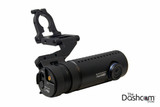
BlendMount BlackVue Dashcam Mirror Stem Mount | Standard Series
A New Level of Discreet Recording Introducing BlendMount mounting brackets designed specifically for BlackVue dashcams! As if the BlackVue dashcams weren't stealthy enough already, BlendMount takes......
User Manual
- Coming Soon!
The DR770X-2CH II Can Be Installed/Powered in One of 3 Ways
- Plug the standard plug-in power cord (included) into an available 12V DC outlet in your vehicle (no "parking mode" recording), or,
- Connect the direct-wire power cable (also included) directly to your fuse box (see diagrams below). This enables safe "parking mode" recording. Or,
- Utilize a standalone BlackVue B-130A battery pack (optional, not included)
The DR770X-2CH II Features Native Parking Mode
Thanks to the BlackVue DR770X-2CH's native (built-in) Parking Mode, the included direct-wire harness can be safely connected directly to the fuse box. Parking mode with low-voltage safety cutoff can then be configured to your specifications in the dashcam settings.
Optional Fuse Tap Bundle
Add our optional fuse tap bundle for the easiest and safest "plug-and-play" integration of the direct-wire harness to your vehicle fuse box.
General BlackVue Dash Cam Installation Resources
Example Installation Photo Galleries
Chevy Silverado - DR900S-2CH + Power Magic Pro:
Tesla Model S - Dual DR900S-2CH + Dual Power Magic Pros:
Dodge Ram 1500 - DR900S-2CH + Power Magic Pro:
Frequently Asked Questions - BlackVue DR770X-2CH
- How does the DR770X-2CH II compare to the DR770X-2CH?
- Enhanced video quality
- 1TB microSD support
- Fast Record: boot time reduced from 24–36s to ~14s
- Improved audio recording with reduced noise
- Optimized Wi-Fi performance
- External GPS Auto Switch (supports external GPS module)
- Included Accessories: USB-C car charger, USB-C power cable, hardwiring cable (cigarette lighter power cable not included)
- New package design
- How does the DR770X-2CH II compare to other BlackVue models? Please see our BlackVue Dash Cam Buyer's Guide for a detailed comparison
- How can I connect to the DR770X-2CH with my smartphone or via the Cloud? Answer: Two Methods to Connect Wirelessly to Your BlackVue Dash Cam
- What options do I have for installing/powering the DR770X-2CH II?
- Plug the standard plug-in power cord (included) into an available 12V DC outlet in your vehicle (no "parking mode" recording), or
- Connect the direct-wire power cable (also included) directly to your fuse box. This enables safe "parking mode" recording. Or
- Utilize a standalone BlackVue B-130A battery pack (optional, not included)
- For more info see our infographic which illustrates 3 ways to install & power your BlackView X-Series dashcam.
- The DR770X-2CH is "Cloud-Capable", please tell me more about that. Please visit our BlackVue Over-the-Cloud page
- Does the DR770X-2CH offer "Parking Mode"? Yes! Please see our Parking Mode and Power Magic FAQ page
- Additional questions? Please see our BlackVue-specific Frequently Asked Questions page.